Remote Commands & Desktop
Run commands across the fleet and start consented, audited remote sessions to a single endpoint.
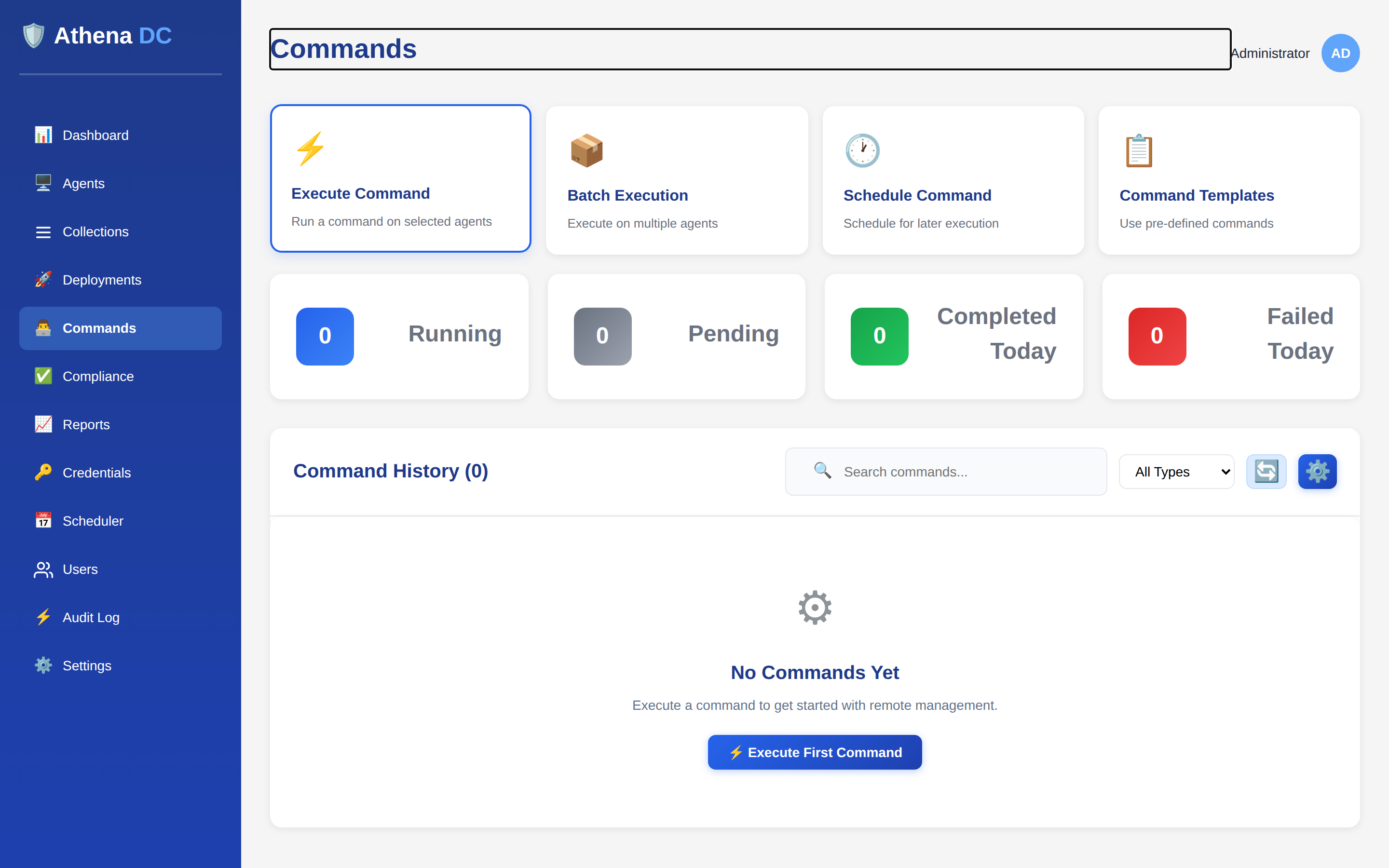
Remote commands#
Remote commands use the api/Commands endpoints, which expose
{id}/execute, {id}/cancel, {id}/retry,
agent/{agentId}, stats and recent. For the full
command lifecycle — targeting, run-as identity, the status model, per-agent results, the REST
API and PowerShell — see Remote Command Execution.
Supported command types:
| Type | Notes |
|---|---|
PowerShell | Run a PowerShell script on the agent |
Batch | Run a Windows batch script |
Shell | Run a shell command |
Executable | Invoke an executable |
Python | Run a Python script |
Chocolatey | Run a Chocolatey operation — auto-installs Chocolatey if it is not already present |
Frequently-run scripts can be saved and reused from the Command Templates library instead of being pasted in each time.
Commands run as SYSTEM or as an alternate user, and support:
- Real-time output streaming — output is flushed roughly every 500 ms or every 50 lines.
- Large-output chunking for output over 1 MB.
- ANSI escape stripping.
- Environment variables.
- Configurable timeouts.
Remote desktop#
Athena offers two mechanisms for remote desktop access — a built-in WebRTC technician screen-share, and an optional RustDesk integration. Both are consent-gated and audited.
WebRTC sessions#
The built-in RemoteSession feature (v8.0) provides technician screen-share over
WebRTC. It is enabled with WebRtcEnabled (true). When a session is
authorized, a session-0 helper (Hermes.RemoteHelper.exe) is launched on the agent
(EnableHelperLaunch).
Session limits:
| Setting | Default |
|---|---|
MaxSessionDurationMinutes | 120 |
ReconnectWindowSeconds | 30 |
- Attended sessions require per-session user consent plus an on-screen indicator.
- Unattended sessions skip the on-screen consent prompt on machines you've designated for it — see Unattended Access.
Sessions can be recorded with user disclosure; recordings are retained for
RetentionDays (30). See
Session Recordings for the record policy, disclosure,
replay/export, retention and API.
When you only need to reach a file rather than the desktop, the Remote File Browser lets an Operator or Admin browse an online agent's drives and folders, view and edit text files, and create or delete items without opening a full session.
Connectivity can use a coturn TURN relay for firewall-deterministic media. See Screen-Share Relay (TURN) for the full walkthrough — configuring the relay, one-click provisioning onto a Linux agent, verifying with Test Connection, and the API and PowerShell equivalents:
# RemoteSession TURN relay
Scheme               = "turn"
Host                 = <relay host>
Port                 = 3478
Transport            = "udp"
CredentialTtlSeconds = 600
# StaticAuthSecret is supplied only via the environment variable:
RemoteSession__Turn__StaticAuthSecret = <secret>
In the shipped default the relay is left out of the media path (direct WebRTC), and is provisioned on demand.
Related endpoints:
| Area | Endpoint |
|---|---|
| Relay provisioning | Screen-Share Relay (TURN) — POST api/agents/{agentId}/provision-relay |
| Session recordings | Session Recordings — api/recordings/… begin / chunk / finalize / stream / download |
| Helper binaries | api/helper-binaries |
| Remote diagnostics | GET api/agents/{agentId}/remote-diagnostics — returns helper version + relay/WebRTC connectivity info |
RustDesk integration#
The RustDesk integration is optional and disabled by default
(Agent:RustDeskEnabled false). It manages a standalone RustDesk client
on each agent — you can install it, set and rotate the per-machine connection password, and push
a fleet-wide security profile from Athena. It is managed via two controller groups:
| Endpoint | Actions |
|---|---|
api/agents/{agentId}/rustdesk | set-password, rotate-password, install, rotation-schedule |
api/rustdesk | apply-to-all, generate-password |
It uses a configurable direct-access port (21118) and supports scheduled password
rotation. Configuration lives under the Agent:RustDesk* keys. See
RustDesk Remote Access for the full walkthrough — enabling it,
installing the client, managing passwords and rotation, the security profile, and PowerShell.
Remote sessions are governed by consent and role policy, and every session start is written to the audit log (see Audit & SIEM).