User Accounts
User accounts are the console operators who sign in to Athena — administrators, operators, helpdesk staff, and read-only users. This page covers creating and updating accounts, assigning a role, deactivating or deleting an account, and resetting a password. All user administration is Admin-only. Local passwords are stored as one-way BCrypt hashes and must meet a minimum complexity policy. Manage users from the console, the REST API, or the PowerShell module.
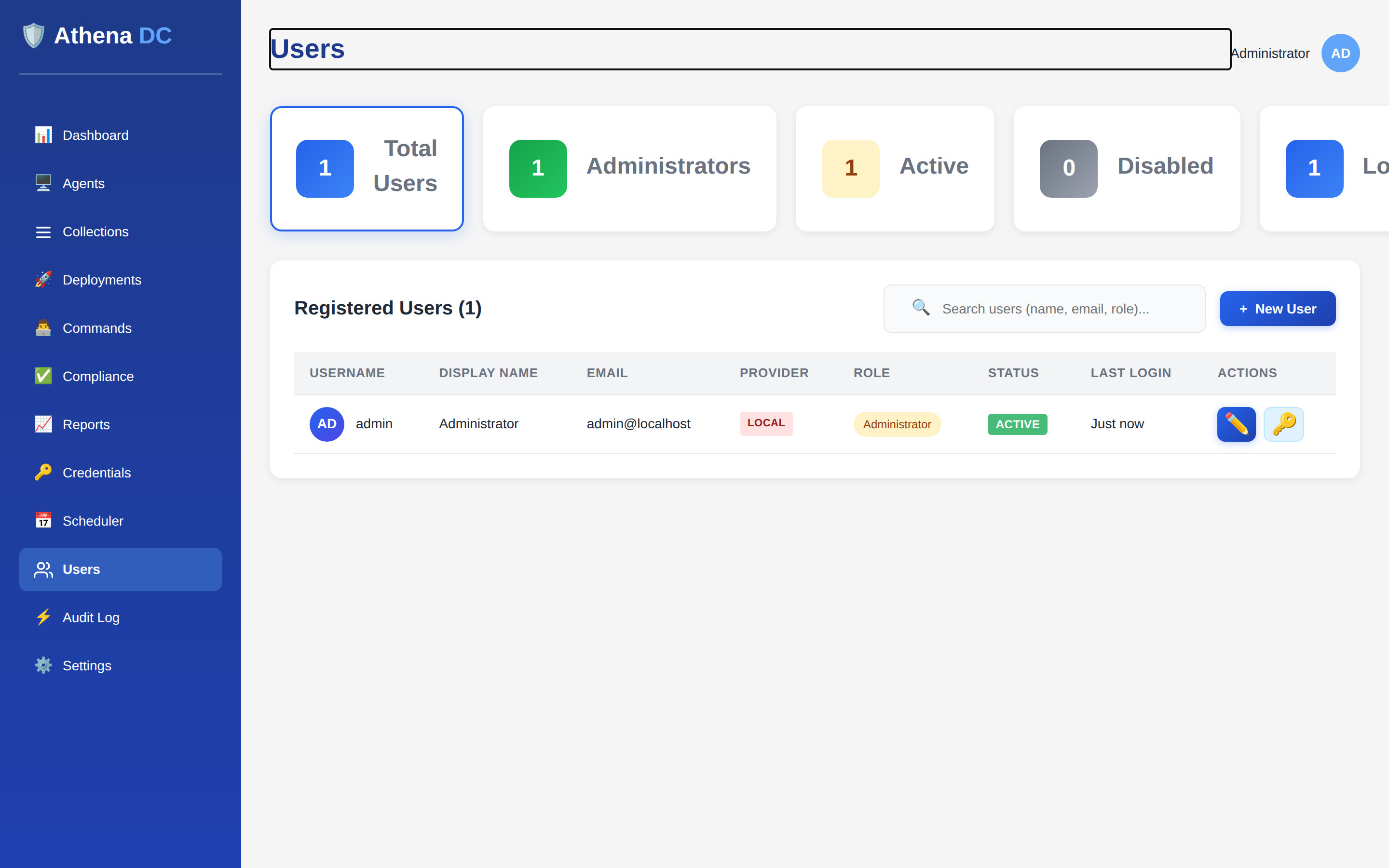
What a user account is#
Each account has a unique username used to log in, a display name, an optional email address, a role, and an active flag. The server also records when the account was created and last modified, and the last login timestamp.
| Field | Meaning |
|---|---|
username | Login name, 3–50 characters. Must be unique; usernames are compared case-insensitively. |
displayName | Friendly name shown in the console and audit log. |
email | Optional email address. |
role | One of User, Helpdesk, Operator, or Admin. New users default to User. |
isActive | Whether the account may sign in. New accounts are active. A disabled account is refused at login even if the password is correct. |
lastLogin | Timestamp of the last successful sign-in (empty until the first login). |
createdAt / modifiedAt | When the account was created and last changed. |
authProvider | The authentication provider that owns the account — Local for accounts created here, or a directory provider (e.g. Ldap) for accounts provisioned by SSO. |
Accounts created through this API are Local accounts with a password stored on the server. Directory accounts (provisioned when a user signs in through LDAP or another SSO provider) have no local password — their password lives in the directory. You can still view and edit a directory account's role and status here, but password reset and change operations are refused for them (see Passwords).
Who can manage users#
Every endpoint on the Users API requires the Admin role — listing, viewing,
creating, updating, deleting, resetting passwords, and checking username availability. Operators,
helpdesk, and standard users cannot reach these endpoints and receive a 403.
The role you assign here is what governs what that user can do everywhere else in Athena. The four fixed roles are:
| Role | Intended access |
|---|---|
User | Minimal access — can view and edit their own profile. |
Helpdesk | View-only across users, agents, deployments, commands, and audit logs. |
Operator | Execution privileges — manage agents, run deployments and commands, manage the scheduler. |
Admin | Full access, including managing users and settings. |
See Roles & Permissions for the complete role model and the policies each endpoint enforces. Creating, updating, and deleting users — and every role change, status change, and password reset — is written to the audit log.
Creating, updating, and removing accounts#
Create a user by supplying a username, a password, a display name, and a role.
The username must be available (a duplicate is rejected with 400) and the password
must satisfy the complexity policy. The account is created as an active
Local account with its password hashed.
Update is a partial change — send only the fields you want to modify
(displayName, email, role, isActive) and the
rest are left untouched. Changing a user's role or toggling their active status is recorded as a
distinct audit event, separate from a general field update. Deactivating an account
(isActive = false) is the reversible way to suspend access without losing the account
and its history.
Delete permanently removes the account — this cannot be undone. As a safeguard,
you cannot delete your own account: attempting to do so returns 400.
Deleting a user removes the row entirely. If you only need to stop someone from signing in —
for example when an operator leaves — set isActive = false instead. The account
stays on record (and keeps appearing in audit trails by username) while being blocked at login.
Passwords#
Local passwords are hashed with BCrypt before storage; the server never keeps or returns a plaintext password. Every password set through this API — at creation and at reset — must meet the same policy:
- At least 8 characters (up to 100),
- at least one uppercase letter,
- at least one lowercase letter, and
- at least one digit.
A password that fails the policy is rejected with 400. An administrator can reset any
Local user's password from the reset-password endpoint without knowing the old
one; this is distinct from a user changing their own password (which requires the current
password and is part of authentication).
Resetting a password only applies to Local accounts. A user provisioned through
LDAP or another SSO provider authenticates against that
directory, so an admin password reset for such an account is refused — change the password in
the directory instead.
REST API#
All endpoints are rooted at api/users, require the Admin role, and
return the standard API envelope.
| Method & path | Purpose |
|---|---|
GET api/users | List users, paginated and ordered by username. Query page (default 1) and pageSize (default 20). |
GET api/users/{id} | Get one user by ID. 404 if not found. |
POST api/users | Create a user. username and password are required and validated; a duplicate username returns 400. Returns 201 Created. |
PUT api/users/{id} | Update a user; only the fields you send are changed. 404 if not found. |
DELETE api/users/{id} | Permanently delete a user. Deleting your own account returns 400; 404 if not found. |
POST api/users/{id}/reset-password | Admin-set a new password for a Local user; enforces the complexity policy. |
GET api/users/check-username/{username} | Check whether a username is available before creating an account. |
POST /api/users
{
  "username": "jdoe",
  "password": "••••••••",
  "displayName": "John Doe",
  "email": "jdoe@example.com",
  "role": "Operator"
}
To update just a role — for example promoting a helpdesk user — send only that field. Role and status changes are audited individually:
# Promote to Admin (other fields untouched)
PUT /api/users/{id}
{
  "role": "Admin"
}

# Deactivate without deleting
PUT /api/users/{id}
{
  "isActive": false
}

# Admin password reset (Local users only)
POST /api/users/{id}/reset-password
{
  "newPassword": "••••••••"
}PowerShell#
The Athena PowerShell module ships five user cmdlets. Passwords
can be supplied as a SecureString so they are never typed in clear text:
# Create a user (plaintext or SecureString password)
New-AthenaUser -Username "jdoe" -DisplayName "John Doe" `
    -SecurePassword (Read-Host -AsSecureString "Password") `
    -Email "jdoe@example.com" -Role Operator

# List users, fetch one, or filter by username
Get-AthenaUser
Get-AthenaUser -Id $id
Get-AthenaUser -Username "jdoe"
Get-AthenaUser -All | Export-Csv users.csv

# Update role, deactivate, or edit profile fields
Set-AthenaUser -Id $id -Role Admin
Set-AthenaUser -Id $id -IsActive $false

# Admin password reset (Local users only)
Reset-AthenaUserPassword -Id $id `
    -SecureNewPassword (Read-Host -AsSecureString "New password")

# Permanently delete (prompts — ConfirmImpact is High)
Remove-AthenaUser -Id $idGet-AthenaUser lists or fetches accounts (use -Username to filter or
-All to page through everyone). New-AthenaUser and
Set-AthenaUser create and update accounts; -Role accepts
User, Helpdesk, Operator, or Admin.
Reset-AthenaUserPassword performs an admin reset, and Remove-AthenaUser
deletes an account — it prompts for confirmation by default because deletion cannot be undone.
All five require the Admin role.