Credential Vault
The Credential Vault stores reusable Local and Domain accounts so that remote commands and software deployments can run as an alternate user instead of the SYSTEM account, and Secrets — a value with no account, such as a BIOS password. Values are encrypted on the server with AES-256-GCM. Account passwords are never returned — you reference a saved credential by its ID, and the server decrypts it only at execution time. A Secret can be revealed by a user with the right permission, and every reveal is audited. Manage the vault from the console, the REST API, or the PowerShell module.
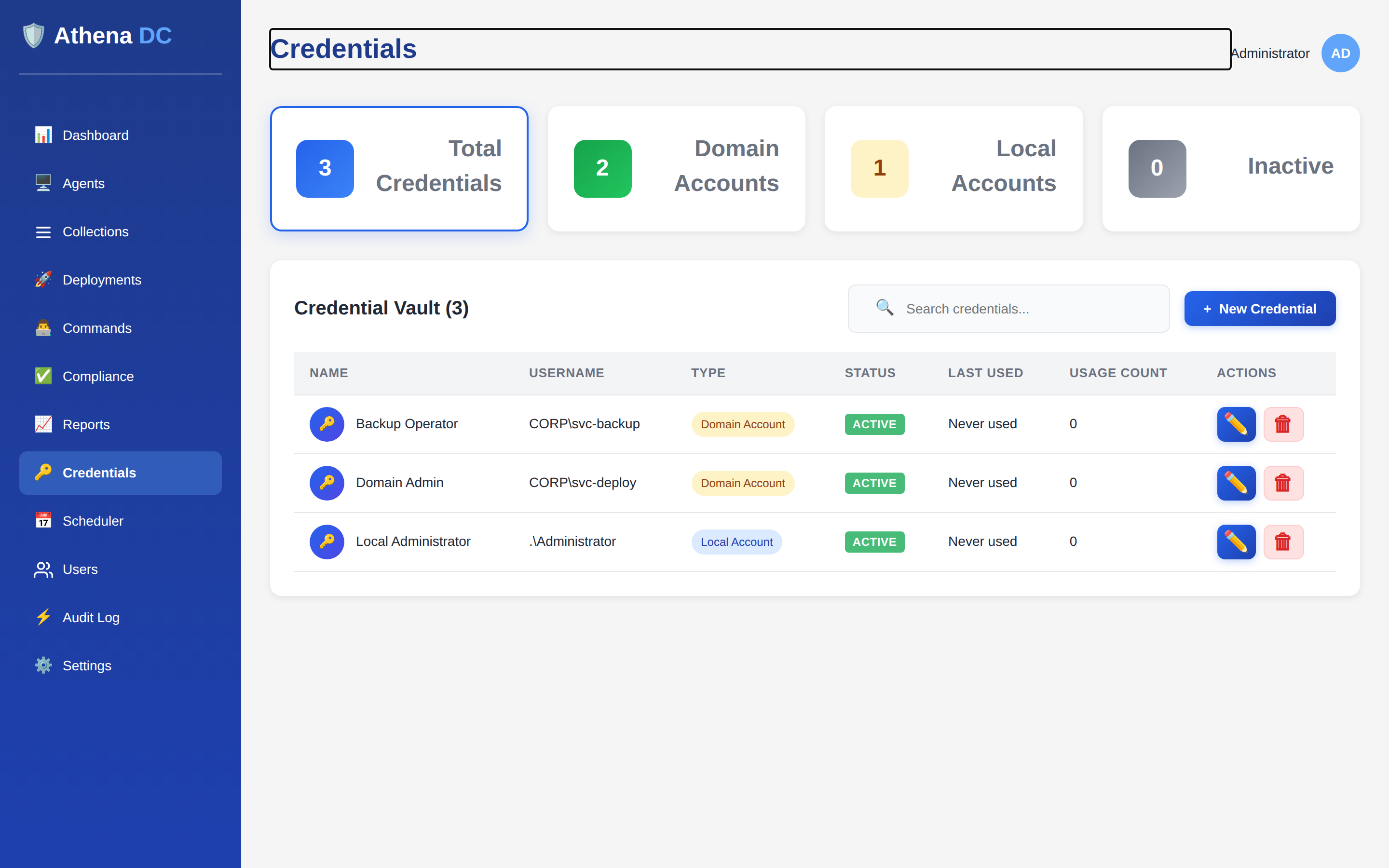
What a credential is#
Each vault entry has a unique name, a password (the stored value), a credential type and — for account types — a username. The type controls how the entry is presented and what it can be used for:
| Type | Console label | Meaning | Display form |
|---|---|---|---|
Local | Local Account | A local machine account, e.g. .\Administrator. | .\username |
Domain | Domain Account | A domain account. Set the domain field alongside the username. | DOMAIN\username (falls back to .\username if no domain is set) |
Secret | Secret | A value with no account, such as a BIOS password. No username is asked for or stored. A Secret is never a Windows logon, so it cannot be used to run a command or a deployment step. | The credential's name |
Alongside those fields, each credential tracks an optional description, an active flag, who created and last modified it and when, and usage telemetry — a usage count and a last-used timestamp that are updated every time the credential is applied. Names must be unique: creating or renaming to a name that already exists is rejected.
Who can use it#
Access to the vault is controlled by four permissions. The built-in roles hold them as follows:
| Permission | What it allows | Built-in roles |
|---|---|---|
credentials.view | Open the Credentials page and list or view credentials (including the lightweight selection list). Never shows a stored value. | Helpdesk, Operator, Admin |
credentials.reveal | Reveal the value of a Secret. Account passwords are never revealed. | Helpdesk, Operator, Admin |
credentials.use | Run commands and deployment steps as a stored credential, or use a stored BIOS password. Never reveals the value. | Operator, Admin |
credentials.manage | Create, update (including rotating the value or deactivating) and delete credentials. | Admin |
The User role holds none of them and does not see the Credentials entry in the
navigation. On the Credentials page, New Credential, Edit and
Delete appear only for users with credentials.manage. Create,
update, delete and reveal are written to the audit log; a password
change is recorded as part of the update event. See
Permission Model for custom roles.
How passwords are protected#
Passwords are encrypted with AES-256-GCM (a 96-bit random nonce and a 128-bit authentication tag per value). The AES-256 key is derived with HKDF-SHA256 from the server's root CA private key — the same PKI that signs agent certificates — so the vault is bound to that specific server's key material and needs no separate password to unlock.
Because the encryption key is derived from the CA private key, the encryption service is only ready once PKI has been initialized. If the CA key is missing, creating a credential — or saving a new password — fails with "Encryption service is not ready. Ensure PKI is initialized." Reads still work; only operations that encrypt or decrypt a password require the key.
Every read endpoint returns the credential's metadata only — the password field is omitted entirely. The server decrypts an account password solely to hand it to an agent at execution time, and only for an active credential. The one way a stored value is ever shown to a person is the audited Secret reveal, and it works for Secrets only.
Revealing a Secret#
A help-desk technician sometimes needs the value of a Secret — for example, to type a BIOS
password at a machine's firmware setup screen. Users with credentials.reveal
(Helpdesk, Operator and Admin by default) can show it on the Credentials page:
- Open Credentials from the navigation.
- On the Secret's row, click the eye button (Reveal secret). It appears on Secret rows only — Local and Domain rows never have it.
- Confirm the prompt "Reveal secret '<name>'? This is audited." by clicking Reveal.
- The value is shown with a Copy button. It is hidden automatically after 30 seconds (a "Secret hidden" notice appears), or when you click Close.
If you used Copy, the console also tries to clear your clipboard when the value is hidden. That clearing is best-effort — your browser may not allow it — so treat a copied value with care.
Each reveal writes a CredentialSecretRevealed event (severity
Warning) to the audit log with the description
"Secret '<name>' revealed by <user>". The value itself is never written to the
audit log or the server logs. The audit entry is written before the value is
returned; if it cannot be written, the value is withheld. There is no limit on how often a
Secret can be revealed, so review these events in the audit log or your
SIEM.
If a reveal fails#
| Message | What it means |
|---|---|
| "You do not have permission to reveal secrets" | Your role lacks credentials.reveal (for example, it was removed after the page loaded). |
| "The credential no longer exists" | Someone deleted the credential. Refresh the page. |
| "Only a secret can be revealed - account passwords are never shown" | The credential is a Local or Domain account. Account passwords are write-only. |
| "The stored secret could not be decrypted" | The stored value cannot be read with the server's current key. See Certificates & PKI. |
| "The reveal could not be audited, so the secret was withheld" | The audit entry could not be written, so no value was returned. Check server health and the database, then try again. |
| "Could not copy to the clipboard" | The browser refused clipboard access. Read the value from the dialog instead. |
Running as a stored credential#
A remote command runs either as SYSTEM or as a
stored credential. When you choose a stored credential, set the command's
runAsSystem to false and provide the credential's
credentialId. At execute time the server looks up the credential, decrypts it, and
passes the username, password, and domain to the agent; it also increments that credential's
usage count.
If a command is set to run as a stored credential (runAsSystem = false) but no
credential is attached, or the referenced credential is missing, inactive, or cannot be
decrypted, the command is refused — it does not silently fall back to running
as SYSTEM. The failure is recorded in the audit log.
The same RunAs choice applies to deployment
packages: a package runs as SYSTEM by default, or as a specific credential when you set its
run-as option to use a credential and supply the credentialId. Use the lightweight
selection endpoint (below) to populate a credential picker in your own tooling. Running as a
stored credential needs the credentials.use permission on top of the permission to
run the command or save the package.
A Secret can never be chosen as a run-as account. A command is rejected with "Credential '<name>' is a secret, and a secret is never a Windows logon - it cannot be used to run a command.", and a deployment step with a similar message naming the step.
REST API#
All endpoints are rooted at api/credentials and return the standard API envelope.
| Method & path | Purpose | Permissions |
|---|---|---|
GET api/credentials | List credentials (active only by default; add ?activeOnly=false to include inactive). Passwords are never included. | credentials.view |
GET api/credentials/select | Lightweight list (id, name, display name, type) for dropdowns. | credentials.view |
GET api/credentials/{id} | Get one credential's metadata. 404 if not found. | credentials.view |
POST api/credentials | Create a credential. name and password are required, and username too unless the type is Secret; a duplicate name returns 400. | credentials.view + credentials.manage |
PUT api/credentials/{id} | Update a credential; only the fields you send are changed. Omit password to keep the existing one. | credentials.view + credentials.manage |
POST api/credentials/{id}/reveal | Return the value of a Secret as { "value": "…" } in the API envelope, with Cache-Control: no-store. Audited on every call. 404 not found; 400 for a Local or Domain account; 500 if the value cannot be decrypted or the reveal cannot be audited (no value is returned). | credentials.view + credentials.reveal |
DELETE api/credentials/{id} | Permanently delete a credential. 404 if not found. | credentials.view + credentials.manage |
POST /api/credentials
{
  "name": "DomainAdmin",
  "description": "Domain admin account for deployments",
  "username": "admin",
  "domain": "CONTOSO",
  "password": "••••••••",
  "credentialType": 1
}
credentialType is 0 for Local, 1 for
Domain and 2 for Secret (omit username and
domain for a Secret). On success the created credential is returned (without the password) with a
201 Created. To rotate a password later, send just that field:
PUT /api/credentials/{id}
{
  "password": "••••••••"
}

# Deactivate without deleting
PUT /api/credentials/{id}
{
  "isActive": false
}
Deactivating a credential (isActive = false) keeps it in the vault but hides it
from the default list and the selection endpoint, and stops it from being used at execution time
— a safer alternative to deletion when you want to retire an account but keep its history.
PowerShell#
The Athena PowerShell module ships four credential cmdlets.
Passwords are passed as a SecureString, so they are never typed in clear text on
the command line:
# Create a local admin credential
New-AthenaCredential -Name "LocalAdmin" `
    -Username "Administrator" `
    -Password (Read-Host -AsSecureString "Password") `
    -CredentialType Local

# Create a domain credential with a description
New-AthenaCredential -Name "DomainAdmin" `
    -Username "admin" -Domain "CONTOSO" `
    -Password (Read-Host -AsSecureString "Password") `
    -CredentialType Domain -Description "For deployments"

# Create a Secret (no username), e.g. a BIOS password
New-AthenaCredential -Name "BIOS-HP-Fleet" -CredentialType Secret `
    -Password (Read-Host -AsSecureString "BIOS password")

# List credentials (passwords are never returned)
Get-AthenaCredential
Get-AthenaCredential -IncludeInactive
Get-AthenaCredential -ForSelect            # lightweight picker list

# Rotate a password, then deactivate
Set-AthenaCredential -Id $credId -Password (Read-Host -AsSecureString "New password")
Set-AthenaCredential -Id $credId -IsActive $false

# Permanently delete (prompts — ConfirmImpact is High)
Remove-AthenaCredential -Id $credIdGet-AthenaCredential lists or fetches (credentials.view);
New-, Set-, and Remove-AthenaCredential create, update,
and delete entries and also need credentials.manage. New- and
Set- take the password as a SecureString. On New-AthenaCredential, -Username is
required for Local and Domain and not used for Secret.
Remove- prompts for confirmation by default because deletion cannot be undone.
No cmdlet reveals a Secret — use the Credentials page or the REST endpoint above.