Registration Tokens
A registration token is the credential a machine presents when it first joins the fleet. No token, no enrollment — the server rejects any agent that registers with an invalid or expired token. Each token carries an expiration and a maximum usage count, so you can hand out a single-use token for one host or a bulk token for a whole rollout, then revoke it the moment you're done. Tokens are managed entirely by administrators through the console, the REST API, or PowerShell.
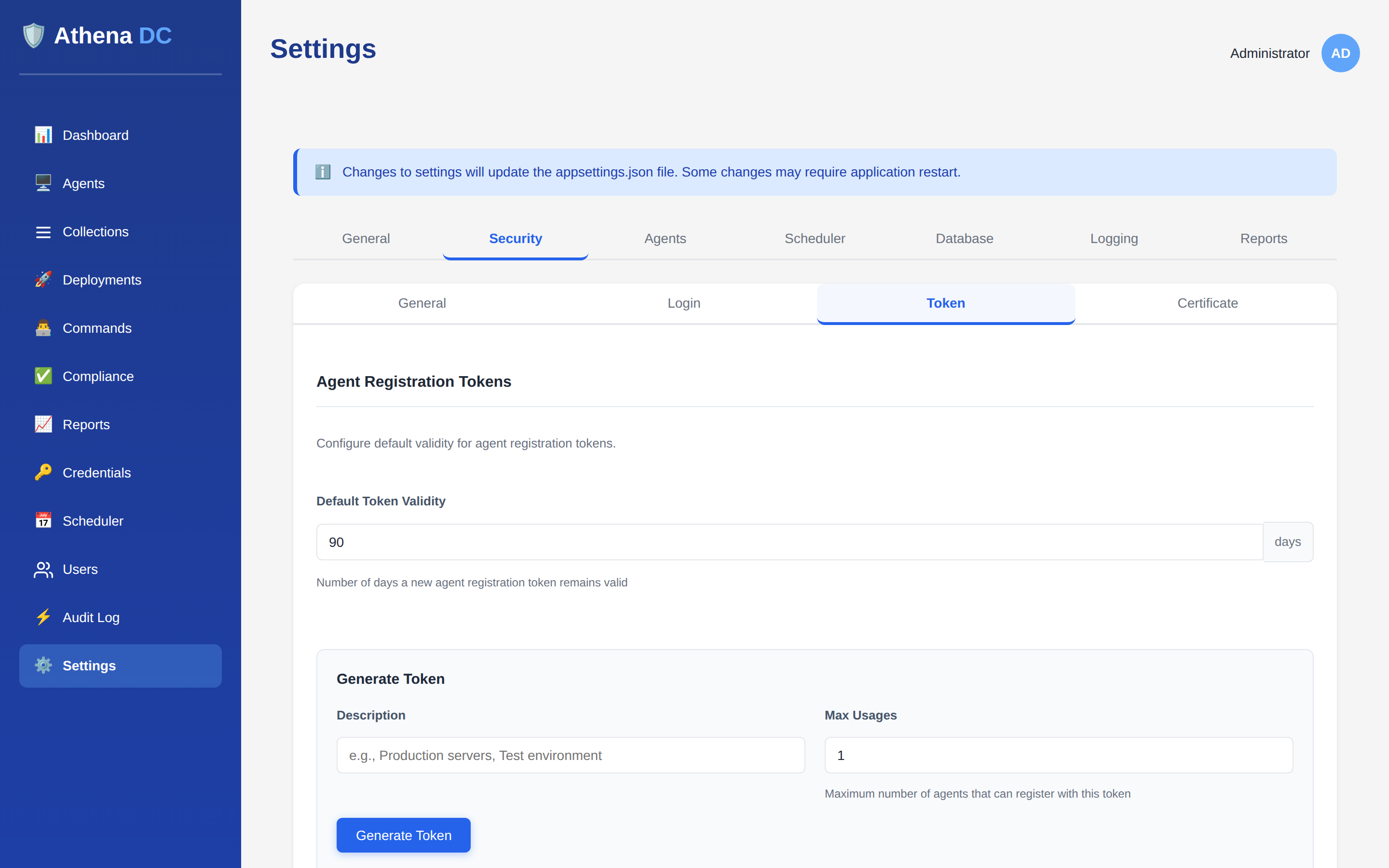
This page covers the registration-token lifecycle itself. For the end-to-end host onboarding flow — installer one-liners, agent configuration, and certificates — see Agent Enrollment.
What a token holds#
Every token record tracks the following fields:
| Field | Meaning |
|---|---|
id | Unique identifier (GUID). |
token | The secret value. Returned only once, at creation. All later reads return it as null. |
description | Free-text purpose, e.g. "Production servers". |
expiresAt | When the token stops being valid. |
maxUsages | How many agents may register with it (default 1). |
usageCount | How many times it has been used so far. |
isValid | true only while not expired and usageCount < maxUsages. |
createdBy / createdAt | Who created the token and when. |
lastUsedAt | Timestamp of the most recent successful registration (null if never used). |
The server stores only a SHA-256 hash of the token, never the plaintext.
Capture the token field from the creation response and store it securely — it can
never be retrieved again. If you lose it, delete the token and create a new one.
Validity & usage limits#
When you create a token you choose how long it lasts and how many hosts it may enrol:
- Validity defaults to
24hours. SupplyvalidityHoursto change it, orvalidityMinutesfor finer control — whenvalidityMinutesis set it takes precedence overvalidityHours. Both must be greater than0. - Max usages defaults to
1(a single-use token). SetmaxUsageshigher for bulk enrollment. It must be greater than0.
A token is considered valid only while both conditions hold: the current time is before
expiresAt, and usageCount is still below maxUsages. Once a
token reaches its usage limit or passes its expiry it is treated as invalid — new registrations
are refused, but agents that already enrolled with it keep working.
How a token is used at enrollment#
When an agent registers, the server:
- Validates the token — it must exist, be unexpired, and still have usages remaining. If not, registration is rejected with "Invalid or expired registration token".
- Creates the agent record and issues its per-agent X.509 certificate signed by the server's CA.
- Marks the token used —
usageCountis incremented andlastUsedAtis stamped. OnceusageCountreachesmaxUsages, the token can no longer be used.
After enrollment the agent authenticates with its certificate, so the registration token is only ever needed for that first handshake. See Certificates & PKI for how certificates are issued and renewed.
Revoke vs. delete#
There are two ways to retire a token, and they behave differently:
| Revoke | Delete | |
|---|---|---|
| Endpoint | POST api/tokens/{id}/revoke | DELETE api/tokens/{id} |
| Effect | Sets expiresAt to now, immediately marking the token invalid. | Permanently removes the token record. |
| Record kept? | Yes — the token still appears (as expired) for the audit trail. | No — the row is gone. |
| When to use | Preferred: stops new registrations while preserving history. | Cleanup only, when you don't need the record. |
Revoking a token that is already revoked or expired returns 400. Neither action
affects agents that already registered with the token. Both actions are written to the
audit log (event types TokenRevoked and
TokenDeleted; creation logs TokenCreated).
Roles#
Every token endpoint requires the Admin role — listing, viewing, creating,
revoking, and deleting are all Admin-only. Callers without Admin receive 403;
unauthenticated callers receive 401. See
Roles & Permissions.
REST API#
| Method & path | Purpose |
|---|---|
GET api/tokens | List tokens (paginated). |
GET api/tokens/{id} | Get one token by ID (value not returned). |
POST api/tokens | Create a token — response includes the one-time value. |
POST api/tokens/{id}/revoke | Revoke a token (expire it now). |
DELETE api/tokens/{id} | Delete a token record permanently. |
GET api/tokens accepts page (default 1),
pageSize (default 20), and includeExpired (default
false). By default expired tokens are hidden and results are ordered newest-first.
Create a token#
# Bulk token: valid 1 week, up to 100 registrations
POST api/tokens
{
  "description": "Production servers",
  "validityHours": 168,
  "maxUsages": 100
}
The 201 Created response carries the token value once, with the reminder
"Store the token value securely — it will not be shown again." Omitting the body fields
yields the defaults (24 hours, single use). Invalid values — a non-positive
validityMinutes, non-positive validityHours, or non-positive
maxUsages — return 400.
The console's Settings → Agent installer flow and the downloadable ZIP bundle generate their own short-lived tokens for you, so you rarely need to call this endpoint by hand for one-off enrollment. Use the API and the cmdlets below when you're scripting rollouts. See Unattended enrollment.
PowerShell#
The Athena module ships four token cmdlets (all require Admin):
| Cmdlet | Purpose |
|---|---|
Get-AthenaRegistrationToken | List tokens or fetch one by -Id. Supports -Page, -PageSize, -IncludeExpired, and -All. |
New-AthenaRegistrationToken | Create a token. -Description, -ValidityHours (1–8760), -MaxUsages (1–10000). |
Revoke-AthenaRegistrationToken | Revoke a token by -Id (expire it now). Prompts for confirmation; use -Force to skip. |
Remove-AthenaRegistrationToken | Permanently delete a token by -Id. Prompts for confirmation; use -Force to skip. |
# Create a bulk token and copy its value to the clipboard
$token = New-AthenaRegistrationToken -Description "Bulk enrollment" -ValidityHours 168 -MaxUsages 100
$token.Token | Set-Clipboard

# Tidy up: delete every already-invalid token
Get-AthenaRegistrationToken -IncludeExpired |
  Where-Object { -not $_.IsValid } |
  Remove-AthenaRegistrationToken -Force
See the PowerShell Module reference for full cmdlet details.
Tokens live entirely on your server — nothing calls out to the internet. Mint a bulk token, embed it in the installer bundle you copy onto the isolated network, and revoke it once every host is enrolled. See Air-Gapped Operation.