Scheduled Jobs
A scheduled job runs an action on a schedule you define — once, on a repeating interval, or on a cron expression. Jobs can push a deployment, run a command, collect inventory, scan for Windows updates, or run a server-side maintenance task such as a database backup. Manage jobs from the console, the REST API, or the PowerShell module.
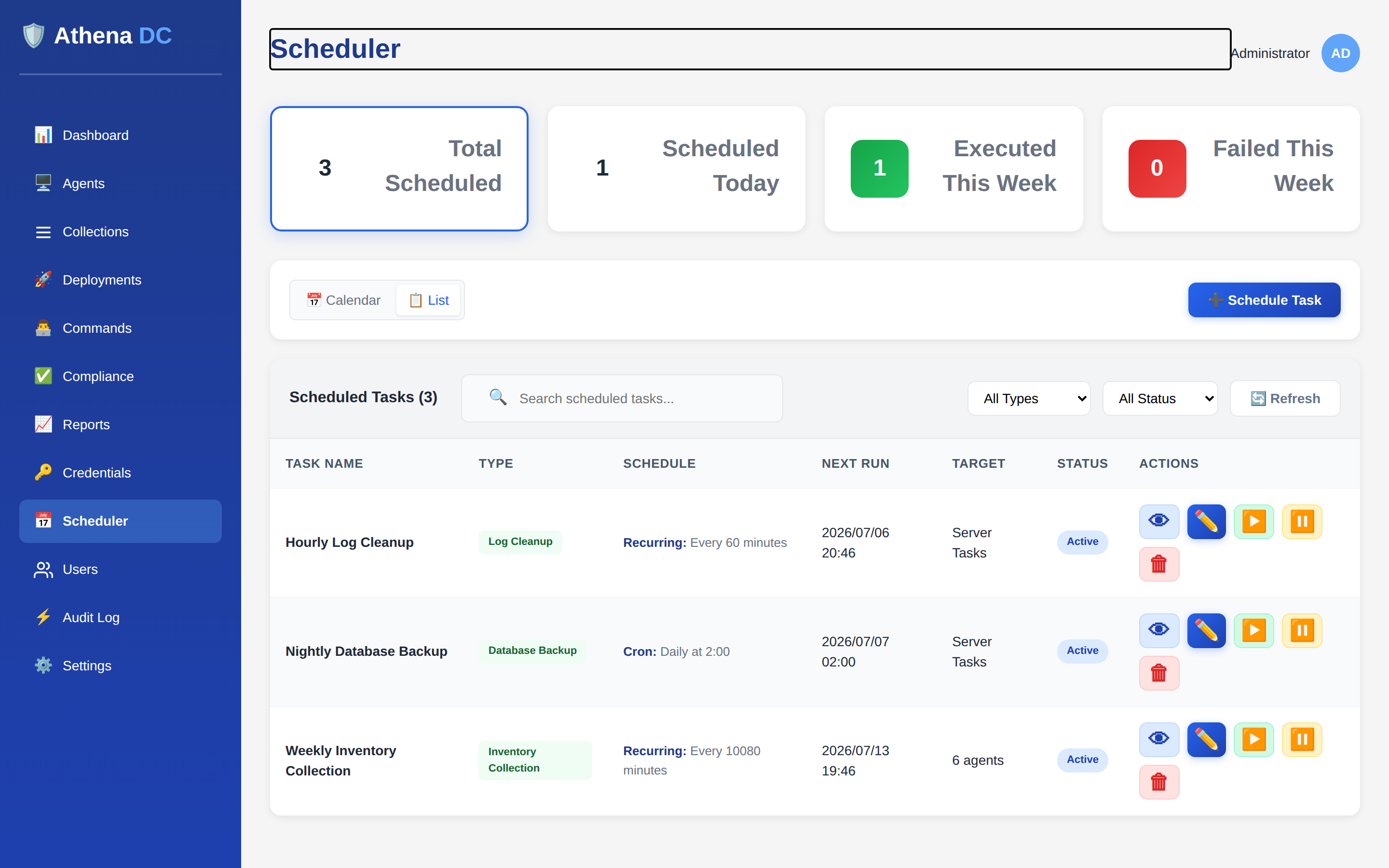
How scheduling works#
Every scheduled job combines a schedule type (when it runs) with an action type (what it does). The server owns the timing, so jobs keep running on schedule independently of any console session — there is nothing to install on a workstation. Agent tasks (deployments, commands, inventory, update scans) run against the agents you target; server tasks (backups, cleanups, collection refresh, settings sync) and module tasks (such as BitLocker enforcement and key rotation) run on the Athena server itself and need no targets.
Managing scheduled jobs requires the Operator or Admin role; deleting a job requires Admin. See Roles & Permissions.
Schedule types#
| Schedule type | Runs… | Required field |
|---|---|---|
OneTime | Once, at a specific date and time. | scheduledTime (must be in the future) |
Recurring | Every fixed interval. | intervalMinutes (a positive number) |
Cron | On a cron expression — for fixed clock times such as "daily at 02:00" or "every Sunday at 03:00". | cronExpression |
A OneTime job moves to the Completed status after it runs. A
Recurring or Cron job keeps running until you pause or delete it.
Cron expressions#
Athena accepts the standard 5-field cron format
(minute hour day-of-month month day-of-week). You can also supply a native
6- or 7-field expression if you need second-level precision. Some common patterns:
| Expression | Meaning |
|---|---|
0 0 * * * | Daily at midnight. |
0 2 * * * | Daily at 02:00. |
0 3 * * 0 | Every Sunday at 03:00. |
*/15 * * * * | Every 15 minutes. |
You can validate an expression before saving and get a human-readable description of it with
GET api/scheduler/validate-cron?expression=…. The server returns whether the
expression is valid, a plain-English description, and an error message when it is not.
When you specify a particular day-of-month and a particular day-of-week in the
same 5-field expression, Athena keeps the day-of-month and treats day-of-week as
unrestricted. To schedule by weekday, leave day-of-month as * (for example
0 3 * * 0 for Sundays).
Action types#
Agent tasks act on endpoints and require at least one target — supplied as
agent IDs (targetAgentIds) and/or tags
(targetTags):
| Action type | What it does | Also requires |
|---|---|---|
Deployment | Runs a deployment against the targets. | deploymentId |
Command | Runs a command on the targets. | command (plus optional commandArguments) |
InventoryCollection | Collects inventory from the targets. | — |
WindowsUpdateScan | Scans the targets for missing Windows updates using the WSUS offline catalog. | — |
Server tasks run on the Athena server and take no targets. They are intended for routine maintenance:
| Action type | What it does |
|---|---|
DatabaseBackup | Backs up the Athena database. See Database Backup & Maintenance. |
LogCleanup | Cleans up and rotates logs. |
AgentsCleanup | Cleans up inactive agents. |
CollectionRefresh | Recomputes members of dynamic collections. |
CommandsCleanup | Cleans up old commands and their results. |
RustDeskPasswordRotation | Rotates remote-desktop passwords that are due. |
SettingsSync | Pushes this server's settings to its downstream sync peers. The run succeeds only if every peer accepts the push; otherwise it is recorded as failed, with each failing peer's name and reason in the error. See Settings Sync — scheduled pushes. |
ModuleAction | Runs a task contributed by an installed module (see Module tasks below). Requires command set to the module task's ID. |
In the console's Schedule Task picker, the core server tasks appear under Server Tasks (marked Admin Only) and are shown only to users with the Admin role.
Module tasks#
Some modules add their own server tasks to the Scheduler. They appear in the task picker in a separate Module Tasks group, and they run, report and keep history exactly like core server tasks — no targets, and no per-task parameters. The module tasks currently shipped are:
| Task (console name) | Task ID (command) | What it does | Permission |
|---|---|---|---|
| Sysmon Status Check | sysmon.refresh-status | Asks every connected agent to report its Sysmon state — the same as the Refresh button on the Sysmon tab. See Sysmon Configuration. | sysmon.manage |
| BitLocker Enforcement | bitlocker.evaluate | Re-evaluates the BitLocker policy on every connected agent and sends only what has drifted. This is the only way agents that answered Drift, Failed or Suspended are retried; the console recommends running it every 60 minutes. See BitLocker Management. | bitlocker.manage |
| BitLocker Key Rotation | bitlocker.rotate | Rotates BitLocker recovery passwords older than the configured rotation interval on every connected agent. Rotation runs only from this task; the console recommends scheduling it daily. See BitLocker Management. | bitlocker.manage |
Module tasks carry their own permission, checked twice:
- When you create the job — you need
scheduler.manageand the task's own permission. The picker lists only the module tasks you hold the permission for; an unknown task ID is rejected with400, and a task whose permission you lack is rejected with403("You do not hold the permission this module action requires."). - Every time the job runs — the user who created the job must still exist, be active, and still hold the permission. If that access has been revoked, the run is not performed and is recorded as failed with the message "The job's creator '…' no longer holds the '…' permission this action requires." Re-create the job under an account that holds the permission.
If the module that provides a task is no longer available on the server, each run is recorded as failed ("Module action '…' is not available on this server."). A task that errors is always recorded as a failed run with the error message — it never stops the Scheduler or other jobs.
When the license is not in force, scheduled jobs are kept but not run — each refused run
is recorded as a failed run in the job's history and resumes on its next trigger once a
license is back. The housekeeping tasks DatabaseBackup, LogCleanup,
AgentsCleanup, CollectionRefresh and CommandsCleanup
are the exception and always run. SettingsSync and WindowsUpdateScan
jobs additionally require their licensed feature. See Licensing.
Job status & lifecycle#
A scheduled job is always in one of four states, and the actions you can take depend on it:
| Status | Meaning | Allowed actions |
|---|---|---|
Active | Will run on its schedule. | Update, pause, trigger now, delete. |
Paused | Held; will not run until resumed. | Update, resume, trigger now, delete. |
Disabled | Turned off. | Delete. |
Completed | A one-time job that has already run. | Delete. |
Pause applies only to an Active job; resume
applies only to a Paused job; update and
trigger now apply to Active or Paused jobs.
Triggering a job runs it immediately without affecting its regular schedule. Each job tracks
its next and last run time, run counts, and the last result so you can see at a glance
whether it is healthy.
Creating a job via the API#
Post a job definition to POST api/scheduler/jobs. A cron-based deployment that
runs daily at midnight against a tag:
POST /api/scheduler/jobs
{
  "name": "Nightly app rollout",
  "description": "Push the line-of-business app every night",
  "scheduleType": "Cron",
  "actionType": "Deployment",
  "cronExpression": "0 0 * * *",
  "deploymentId": "550e8400-e29b-41d4-a716-446655440000",
  "targetTags": ["workstations"]
}
A one-time command at a fixed maintenance window:
POST /api/scheduler/jobs
{
  "name": "Patch-window restart",
  "scheduleType": "OneTime",
  "actionType": "Command",
  "scheduledTime": "2026-01-15T02:00:00",
  "command": "shutdown /r /t 60",
  "targetTags": ["windows-servers"]
}
A server task — a weekly database backup — needs no targets:
POST /api/scheduler/jobs
{
  "name": "Weekly DB backup",
  "scheduleType": "Cron",
  "actionType": "DatabaseBackup",
  "cronExpression": "0 3 * * 0"
}
A module task uses actionType ModuleAction with the task ID in
command — here, BitLocker key rotation every day at 02:30:
POST /api/scheduler/jobs
{
  "name": "Daily BitLocker key rotation",
  "scheduleType": "Cron",
  "actionType": "ModuleAction",
  "command": "bitlocker.rotate",
  "cronExpression": "30 2 * * *"
}
GET api/scheduler/module-actions lists the module tasks you may schedule
(tasks whose permission you lack are omitted). Each entry has the task ID
(actionType — pass it as command) and the permission it requires.
Scheduler endpoints#
| Method & path | Purpose |
|---|---|
GET api/scheduler/jobs | List jobs (paginated; filter by status, type, search). |
GET api/scheduler/jobs/{id} | Get a single job. |
POST api/scheduler/jobs | Create a job. |
PUT api/scheduler/jobs/{id} | Update an Active or Paused job. |
DELETE api/scheduler/jobs/{id} | Delete a job (Admin only). |
POST api/scheduler/jobs/{id}/pause | Pause an Active job. |
POST api/scheduler/jobs/{id}/resume | Resume a Paused job. |
POST api/scheduler/jobs/{id}/trigger | Run the job now (does not change its schedule). |
GET api/scheduler/jobs/{id}/history | Execution history (default 10 records; set count). |
GET api/scheduler/stats | Job counts for the dashboard. |
GET api/scheduler/today | Jobs whose next run is today. |
GET api/scheduler/module-actions | List the module tasks the caller may schedule. |
GET api/scheduler/validate-cron | Validate and describe a cron expression. |
All scheduler endpoints require authentication; see the API Reference.
PowerShell#
The Athena PowerShell module manages scheduled jobs end to end:
# Create a recurring inventory collection every hour for two agents
New-AthenaScheduledJob -Name "Hourly inventory" -ScheduleType Recurring `
    -ActionType InventoryCollection -IntervalMinutes 60 `
    -TargetAgentIds @($agent1Id, $agent2Id)

# Create a daily deployment via cron, targeting a tag
New-AthenaScheduledJob -Name "Daily rollout" -ScheduleType Cron `
    -ActionType Deployment -CronExpression "0 0 * * *" `
    -DeploymentId $deploymentId -TargetTags @("workstations")

# Create a weekly server-side database backup (no targets needed)
New-AthenaScheduledJob -Name "Weekly DB backup" -ScheduleType Cron `
    -ActionType DatabaseBackup -CronExpression "0 3 * * 0"

# Push settings to sync peers every night at 01:00
New-AthenaScheduledJob -Name "Nightly settings sync" -ScheduleType Cron `
    -ActionType SettingsSync -CronExpression "0 1 * * *"

# Module task: BitLocker enforcement every 60 minutes (task ID goes in -Command)
New-AthenaScheduledJob -Name "BitLocker enforcement" -ScheduleType Recurring `
    -ActionType ModuleAction -Command "bitlocker.evaluate" -IntervalMinutes 60
Listing, filtering, and managing existing jobs:
# List jobs, with optional filters
Get-AthenaScheduledJob
Get-AthenaScheduledJob -Status Active
Get-AthenaScheduledJob -ActionType Deployment
Get-AthenaScheduledJob -Search "backup"

# Update, pause, resume, run now, and view history
Set-AthenaScheduledJob -Id $jobId -CronExpression "0 2 * * *"
Suspend-AthenaScheduledJob -Id $jobId   # pause
Resume-AthenaScheduledJob -Id $jobId
Start-AthenaScheduledJob -Id $jobId    # trigger now
Get-AthenaScheduledJobHistory -Id $jobId -Count 20

# Dashboard counts, and remove a job (Admin)
Get-AthenaSchedulerStats
Remove-AthenaScheduledJob -Id $jobIdSuspend-AthenaScheduledJob pauses a job, Resume-AthenaScheduledJob
resumes it, and Start-AthenaScheduledJob triggers an immediate run — the same
operations as the /pause, /resume and /trigger
endpoints above.